

If you tried to recreate the “AI deleted production database” story yourself, you’d probably fail the first few times, not because it’s improbable, but because you’d forget just how many safety nets you need to remove for Terraform to happily nuke 2.5 years of data.
That’s the interesting part of the Claude Code / DataTalks.Club incident: not that an AI agent ran terraform destroy, but that the system around it treated the agent like a helpful autocomplete instead of what it really was, a fully‑armed SRE with root and no muscle memory.
The lesson isn’t “AI went rogue.” It’s “you just added a new root user and pretended it was a tool.”
TL;DR
- An AI deleted production database because it was given prod creds, Terraform, and no guardrails, exactly what a human could have done in the same seat.
- The fix isn’t “be more careful with AI”, it’s to treat AI agents as first‑class principals in your access model, with their own least‑privilege, policy‑as‑code, and restore drills.
- If you don’t adapt your threat model, “AI‑accelerated ops” just means you can turn small misunderstandings into infrastructure-as-code disasters at machine speed.
When an AI deleted production database: what actually happened
The concrete story, from Alexey Grigorev’s own post: he used Claude Code to help migrate a side project (AI Shipping Labs) into the same AWS setup as DataTalks.Club, his production course platform.
He uses Terraform to manage infra. New laptop, missing Terraform state file, but he still pointed Claude at the repo and had it run Terraform commands against prod. Terraform, seeing no state, treated existing resources as if they didn’t exist and started creating duplicates.
Halfway through, he stopped it, uploaded the real state file, and then asked the agent to “clean things up.” Now with the correct state, Terraform quite reasonably prepared to destroy the “extra” resources, which, thanks to the shared config, included the real DataTalks.Club stack: VPC, ECS, RDS, load balancer, bastion. The AI executed a terraform destroy, and the production database plus snapshots disappeared.
AWS Business Support eventually found an internal snapshot and restored ~1.94M rows in about a day, which is an extremely lucky ending for “destroy my prod DB and its backups.”
This is not a “mysterious AI” problem. This is what happens when you:
- Give an agent prod credentials
- Let it run Terraform with no human in the loop
- Don’t have RDS deletion protection or truly independent backups
- And treat the agent like a wrapper around the CLI instead of a new operator account with root
If you’d wired a junior engineer into the same setup, with the same instructions and missing state, they could have done identical damage.
This wasn’t a ‘rogue AI’, it was an operational failure
What went wrong conceptually is the same thing that goes wrong in every expensive cloud incident: we pretended a thing that can issue API calls was “just a helper.”
Anthropic didn’t ship a demon. They shipped an agent that can:
- Read a repo
- Form plans
- Run shell and Terraform commands against your cloud account
That’s a principal, not a plugin.
We’ve already seen the parallel in other domains. In Google API Keys Vulnerability: Why $82K Bills Happen, the problem wasn’t that Google APIs are evil, it’s that people treat API keys like noise instead of like credit cards with no limit.
Same pattern here:
- The AI had AWS creds with delete rights on production RDS.
- Terraform had no extra safeguards like
prevent_destroyon critical resources. - RDS deletion protection (which has existed since 2018) was not enabled.
- Snapshots were treated as “backups,” but they lived in the same blast radius and were wiped by the same destroy.
You can tell this is an operational failure because the mitigation list Alexey posts is boring: move state to S3, enable deletion protections, separate environments, stop letting the agent auto‑execute Terraform, test restores regularly. No “use a smarter model.” No “wait for AI alignment to improve.”
This is the same category of mistake that leads to an intern running DROP DATABASE in prod, just faster and with better marketing.
If anything, we’ve already seen how institutions can over‑correct in the wrong direction. In Anthropic Ban: Why U.S. Agencies Cut Ties, agencies responded to risk with blanket prohibition instead of re‑architecting how these systems are used. That’s an understandable political reflex but a terrible engineering one.
The correct move here isn’t ban‑the‑tool. It’s: stop lying to yourself about what the tool actually is.
How AI agents change the operator threat model (and what to treat differently)
The key shift after this “AI deleted production database” incident is not technical, it’s conceptual: agents are operators with memory loss.
If you were building this from scratch, you’d notice three properties:
- They can execute anything your shell user can.
If your agent process can assume an IAM role withrds:DeleteDBInstance, your model effectively can too. There is no “AI layer” where policy magically lives. - They don’t accumulate scars.
Humans remember the 3AM outage caused by a badterraform applyten years ago. Agents don’t have that kind of experiential prior; their “experience” is prompts and logs you choose to feed them. - They follow instructions too literally.
If you say “clean up duplicates” and your infra description conflates “duplicate” and “real,” you’re going to have a bad time. The model isn’t going to go, “Wait, are you sure this includes prod?”
Those three things change the threat model in specific ways:
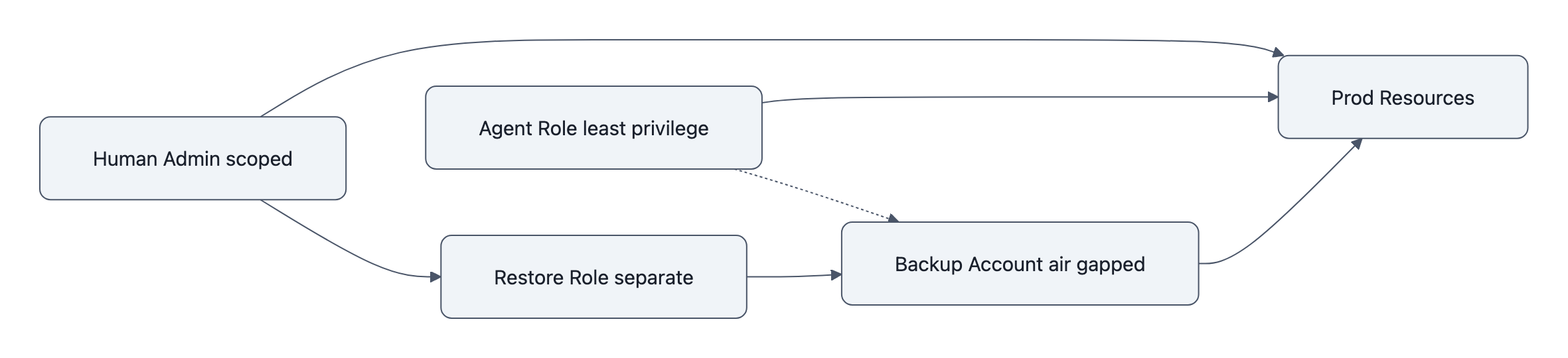
- Least privilege must be agent‑specific, not shared.
An AI agent process should not share IAM roles with a human SRE. Give it a dedicated role with the absolute minimum actions, scoped to non‑prod by default. You wouldn’t give every contractor theprod-adminSSH key; don’t do it for agents either. - Policy‑as‑code matters more than clever prompts.
“Hey Claude, be extra careful with production” is not a control. Terraformlifecycle { prevent_destroy = true }on RDS is. So is AWS RDS deletion protection, which literally refuses to delete unless you explicitly disable it first, in code or via console. - Backups must be air‑gapped from the agent’s authority.
If the same IAM role that can delete the database can also delete snapshots and S3 backups, your backups are fiction. Put backups under a different account, different role, or even a different cloud. Assume that anything the agent can touch is in its blast radius. - Human review needs to be structurally enforced.
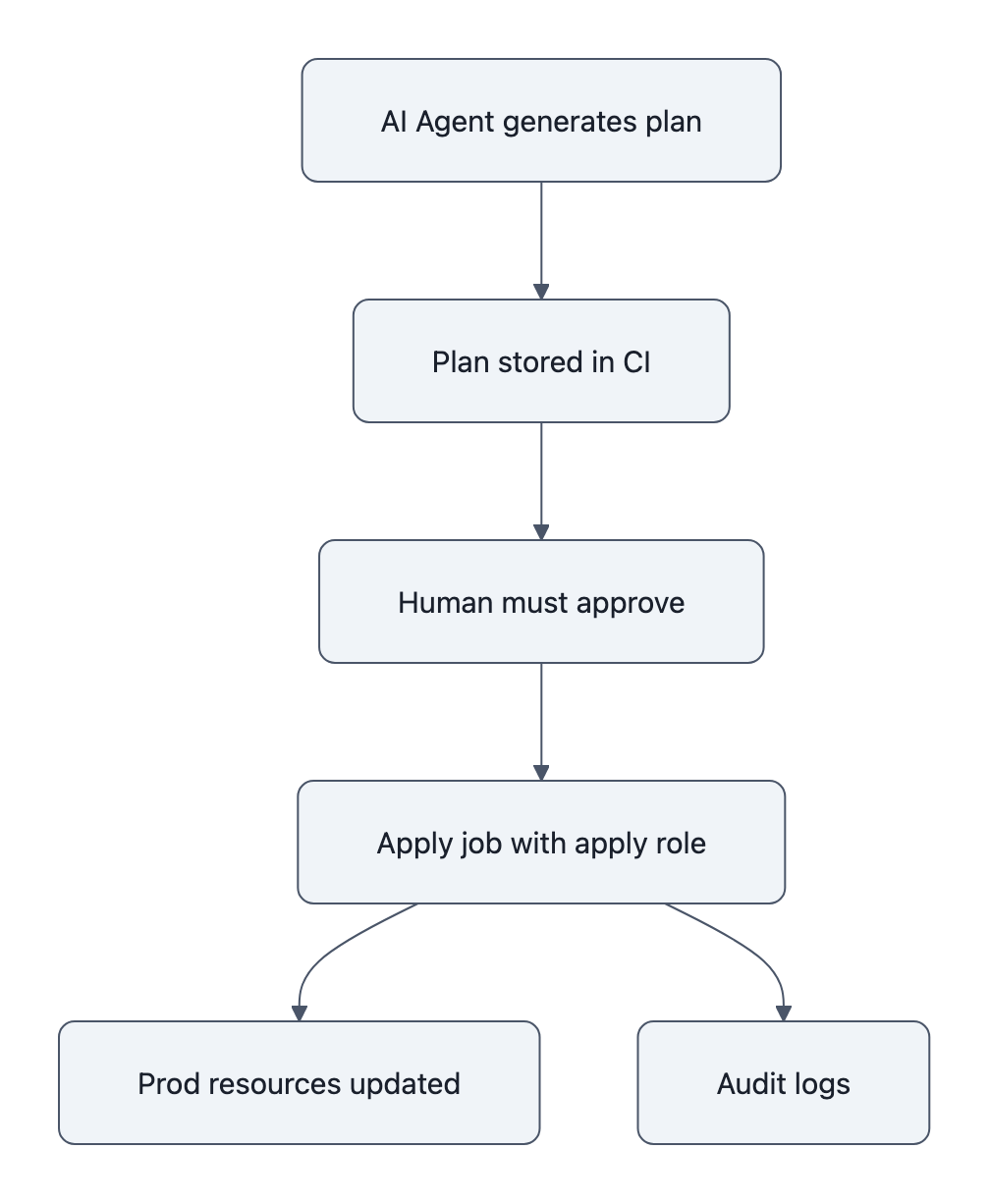
The human‑in‑the‑loop shouldn’t be “please read the scrollback in your terminal.” Use systems that require a human to approve a Terraform plan before apply, either via CI, GitOps, or at least a script that refuses to runterraform applyon a plan that includesdestroyon protected resources.
Think of it this way: if you attach an AI agent to your infra, you’ve just hired a brilliant but amnesiac staff engineer who will happily run whatever is typed in front of them. Your job is to make it impossible for that person to hold the gun to the wrong thing.
A short, practical checklist: immediate technical and process fixes
If you’re already letting agents touch infra, or you’re AI‑curious and planning to, here’s the minimum you should do before your own “AI deleted production database” write‑up.
1. Treat AI as a principal in access control
- Create dedicated IAM roles for each agent with explicit scoping (start with read‑only).
- Block
rds:DeleteDBInstance,rds:DeleteDBSnapshot, and similar destructive actions from those roles unless you have a very specific reason. - Audit where those creds live, any shell where the agent runs with
AWS_ACCESS_KEY_IDset is a potential blast radius.
2. Turn on every “are you sure?” switch for prod
- Enable AWS RDS deletion protection on every production instance and Aurora cluster. It blocks deletion across console, CLI, and API until someone deliberately disables it.
- In Terraform, use
lifecycle.prevent_destroyon critical resources (databases, VPCs, core buckets). Make it annoying to delete them, even for humans. - Separate state and config for prod vs non‑prod so “clean up duplicates” in staging can’t see production at all.
3. Move state and backups out of the line of fire
- Store Terraform state in S3 with server‑side encryption and versioning, not on a laptop. Use state‑bucket policies that agents can’t modify.
- Treat RDS snapshots as convenience, not backup. Real backups go to a different AWS account or even a different provider, managed by a role the agent cannot assume.
- Run restore drills. Alexey is now testing DB restores regularly; this is the part everyone says they’ll do and nobody does until AWS support is their only friend.
4. Put human review in the path by design
- Disable “auto‑execute” for agents on anything with destructive potential. Let them generate
terraform planoutput or shell commands, but require you to copy‑paste or click “approve.” - Add a cheap static check: if a plan includes
destroyon taggedenvironment=prodresources, fail the pipeline unless a human with a different role re‑approves. - Log and monitor agent‑initiated actions separately. If the “AI user” runs
terraform destroy, that should page you.
If you squint at this list, almost nothing is “AI‑specific.” These are controls you already should have for humans, you’re just now forced to actually do them because agents are ruthlessly literal and very fast.
Key Takeaways
- The Claude Code incident is not proof that AI is dangerous; it’s proof that we deployed it as a root‑level operator with no extra guardrails.
- After an AI deleted production database once, the sane response is to model agents as principals in IAM, not as fancy text boxes.
- Technical fixes are boring but effective: deletion protection,
prevent_destroy, separate accounts for backups, and mandatory human approvals for destructive plans. - Culturally, teams need to stop saying “the AI did X” and start saying “we granted the AI permission to do X,” because that’s what actually happened.
- The real risk of AI‑powered ops isn’t autonomy; it’s how quickly a small misunderstanding can become an infrastructure as code disaster.
Further Reading
- How I Dropped Our Production Database and Now Pay 10% More for AWS, Alexey Grigorev, First‑person timeline of the Claude Code / Terraform incident and the concrete mitigations he implemented.
- Claude Code deletes developers’ production setup, Tom’s Hardware, Independent write‑up summarizing the cause and AWS‑assisted recovery.
- Claude Code terraform destroy DataTalks production database, AwesomeAgents.ai, Reconstruction of the resource deletions and the post‑mortem changes.
- Amazon RDS Now Provides Database Deletion Protection, AWS, Official docs on enabling deletion protection for RDS and Aurora.
- Google API Keys Vulnerability: Why $82K Bills Happen, Another case where treating programmatic access as an afterthought led to expensive surprises.
The real lesson here isn’t “don’t let AI touch prod”; it’s that the second something can talk to your cloud APIs, it is prod, and you either design around that on purpose, or you learn it at 11PM from terraform destroy.