

On Monday your side‑project bill is $180 a month.
On Wednesday Google Cloud wants $82,314.44 because someone found an old AIza‑ key and hammered Gemini for 48 hours.
That’s the Google API keys vulnerability in human terms: public keys that were never meant to be secrets suddenly became all‑access passes to an expensive AI buffet.
The core argument: this is not “one idiot dev left a key in JavaScript.” It’s a predictable platform failure: convenience‑first key design, retroactive privilege expansion, and documentation that literally says “API keys are not secret” and “treat your API key like a password” about the same key format. Developers need a cleanup checklist. But cloud vendors need to stop quietly upgrading your public ID badge into a credit‑card‑backed master key.
What the Google API keys vulnerability is and how it produced $82K bills
Start with one specific behavior Truffle Security documented:
Turn on the Gemini API in a Google Cloud project, and existing AIza… API keys in that project can silently start authenticating to Gemini. No prompt, no email, no “these keys are public, are you sure?”
Truffle scanned the November 2025 Common Crawl and individually verified 2,863 public Google API keys that returned 200 OK from Gemini’s /models endpoint instead of 403 Forbidden [Truffle Security]. That means:
- Anyone scraping your site can grab the key.
- They can call:
/files/, to pull your uploaded PDFs/images./cachedContents/, to yank prompts and proprietary context.- Any models endpoint, to run billable inference on your dime.
Meanwhile, Quokka scanned 250k Android apps and found 35,000+ unique Google API keys hardcoded in APKs [Quokka]. That’s the mobile side of the same blast radius.
Now drop one compromised key into that system.
According to The Register, a single developer saw $82,314.44 of Gemini charges in about 48 hours, mostly Gemini 3 Pro Text/Image calls [The Register]. Their normal monthly bill was ~\$180. Support’s first instinct? Point at the “shared responsibility model.”
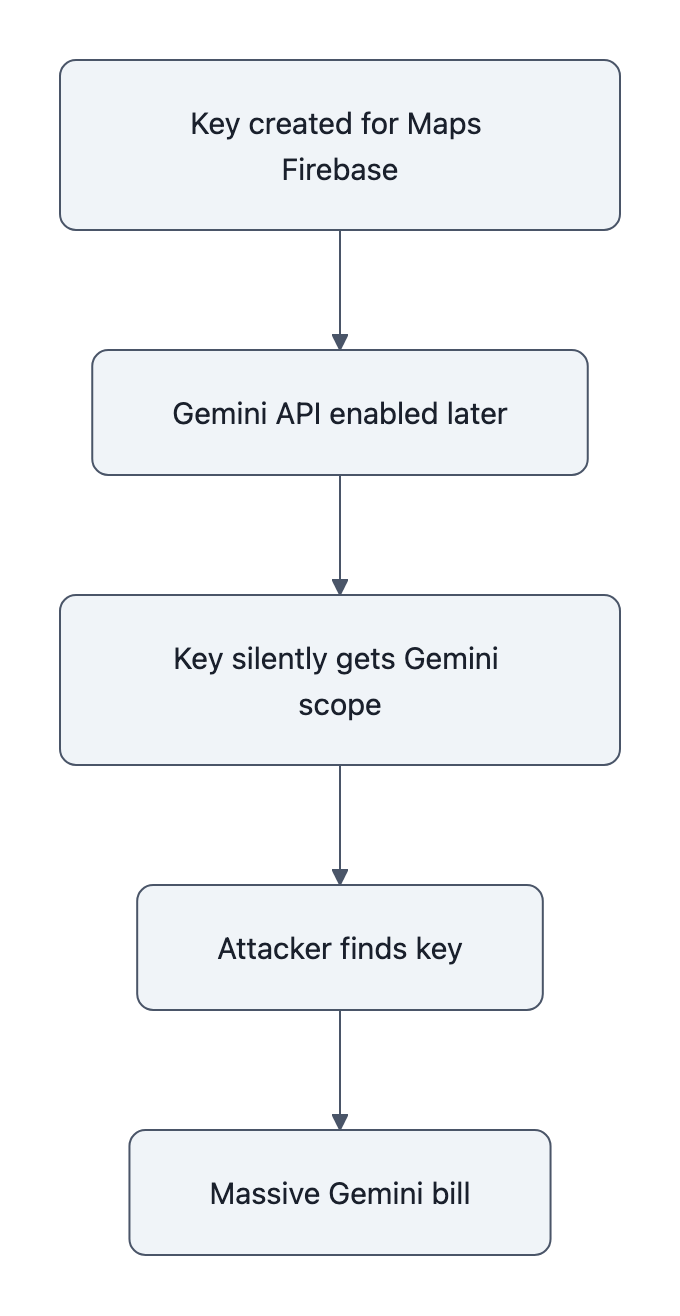
The mechanism is the part you should remember:
- Old key created years ago for Maps / Firebase, happily public.
- Gemini API later enabled in that project.
- Platform automatically gives that same key Gemini permissions.
- Attacker finds the key (web, APK, GitHub, whatever).
- Attacker scripts Gemini calls until they hit your credit limit, or your credit card limit.
No RCE, no zero‑day. Just retroactive privilege expansion on a key that was never designed as a secret.
Why this is a platform design failure, not just a developer mistake
If you’ve worked in security, you’ve seen this movie before: the “default password” that used to only guard a demo panel suddenly ends up on the production control system.
We already wrote about that pattern in the context of museums and default credentials: Google API keys vulnerability, lessons from default‑password failures.
Same story, different props.
Here the smoking gun is Google’s own docs:
- Firebase security checklist:
“API keys for Firebase services are not secret… you can safely embed them in client code.” [Firebase] - Gemini API docs:
“Treat your Gemini API key like a password… Never expose API keys on the client‑side.” [Google AI]
Both refer to the same AIza‑ style key.
If you’re a normal developer, you don’t run a personal threat‑intel team. You read the vendor docs. Historically Google told you, explicitly, “these keys are not secrets.” So you:
- Put them in web JS.
- Bundle them in Android apps.
- Check them into public repos (it’s “just Maps,” right?).
Years later, someone on a different product team ships Gemini and decides “eh, we’ll just reuse the API key infrastructure; less friction, lower support load.” Flip Gemini on for a project, and, per Truffle’s testing, existing AIza‑ keys in that project inherit Gemini capabilities by default.
That’s CWE‑1188 (Insecure Default Initialization) and CWE‑269 (Improper Privilege Management) in standards speak. In plain language: “we changed what this key means without asking you.”
The worst part isn’t the bug. Bugs happen.
The worst part is Truffle’s report that Google’s initial triage label was:
“Intended Behavior.”
When a platform tells you a clearly dangerous configuration is “working as designed,” that’s a governance failure, not an oops.
This is why “just vault your secrets” is such a lazy take. Developers should absolutely be more paranoid. But when the same company says “this is not a secret” and then turns it into a password‑like credential years later, you’ve crossed the line from “misconfiguration” into “vendor‑induced risk.”
Immediate developer checklist: audit, restrict, monitor, and fence AI keys
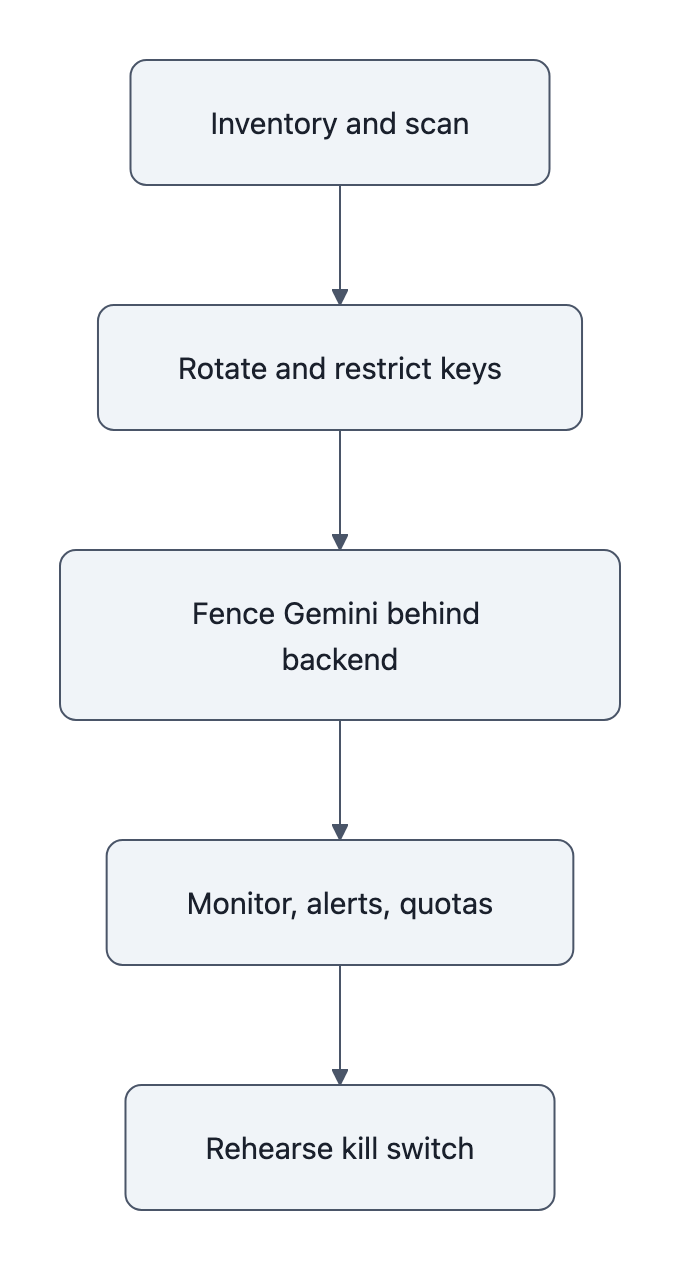
You can’t wait for Google, Amazon, or anyone else to clean this up. Here’s the short, opinionated checklist I’d follow today.
1. Inventory and scan for exposed AIza‑ keys
- Search your code, repos, web assets, and mobile apps for
AIza:grep -R "AIza" .- GitHub Advanced Search for your org.
- Inspect built JS bundles and APKs (use
stringsor a mobile scanner).
- Assume every existing Google API key is high‑risk if Gemini is enabled on that project.
If you find older keys that ever touched client‑side code, treat them as compromised until proven otherwise.
2. Lock down Google Cloud API keys with restrictions
For each surviving key:
- In Google Cloud Console:
- Rotate the key.
- Add application restrictions (HTTP referrers, Android package + SHA‑1, iOS bundle ID).
- Add API restrictions, explicitly allow only the APIs you intend (e.g., Maps), exclude Gemini / Generative Language API.
- Create separate keys per use‑case: one for Maps, one for Firebase client analytics, etc. Never a “one key to rule them all.”
If a key cannot be reasonably locked down (legacy, unknown consumers, no idea where it lives), schedule a sunset and replacement. Yes, it’s tedious. Compare it to \$82k.
3. Fence Gemini API keys like you would Stripe or your database
Treat Gemini keys as payment credentials:
- Never expose them to browsers or mobile apps.
- Put them behind:
- A backend service that authenticates your user.
- A gateway that rate‑limits, logs, and enforces quotas per user or tenant.
- Prefer short‑lived tokens:
- Store the real Gemini key in a secrets manager.
- Issue your own signed, time‑limited tokens to frontends if you must call AI directly.
- Put separate billing and usage alerts:
- Hard budgets on Gemini in Google Cloud.
- Alert at 2×, 5×, 10× your normal daily spend.
- Turn on “disable services at budget limit” if your risk tolerance is low.
If you’re shipping a mobile or desktop app, don’t ship a Gemini key at all. Ship calls to your API, and let your backend talk to Gemini.
4. Monitor for abuse like it’s a production incident, not an experiment
This is where “AI is just a toy” thinking will hurt you.
- Log every Gemini call with:
- Caller identity (user ID / tenant).
- Source IP or app.
- Prompt metadata (high‑level, not user PII).
- Set automated rules:
- Block if QPS spikes beyond what your front door sees.
- Block if a single API key or project bursts to 100× its normal daily tokens.
- Practice the “kill switch”:
- Know exactly how to:
- Revoke a key.
- Disable Gemini for a project.
- Shut off billing on the account if needed.
- Know exactly how to:
If you don’t know that path today, write it down and rehearse it once. Future you will be grateful.
What Google (and other cloud providers) must change to prevent retroactive billing
Now the part developers don’t control.
If you’re building the platform, this is the to‑do list you keep ignoring because it “adds friction.” The Google API keys vulnerability shows exactly why that’s no longer acceptable.
1. No more retroactive privilege expansion
If a credential format was ever documented as “not secret,” you do not get to reuse it to authenticate billable AI calls.
Minimum sane rule:
- New security‑sensitive products (AI, storage, billing scopes) must use new credential types or explicit opt‑in upgrades.
- When enabling a new powerful API on a project:
- Default: no existing keys gain access.
- Force the user to create new keys or explicitly select which ones to upgrade.
If Google had done that, Truffle’s 2,863 live keys would have been random public identifiers, not AI master keys.
2. Hard, enforced billing safety rails for new APIs
Cloud billing abuse is not a hypothetical; we now have an \$82k invoice as evidence.
Vendors should:
- Ship per‑API default spend caps (e.g., new Gemini projects cap at \$100/day until manually raised).
- Provide real‑time anomaly detection for high‑risk APIs:
- “We saw a 1,000× spike on this API key in 15 minutes; we paused it and emailed you.”
- Offer one‑click amnesty for first‑time abuse for clearly compromised keys:
- Mark usage as fraudulent.
- Revoke keys and enforce safer defaults.
The cost of that goodwill is small compared to the reputational hit of “we told you this key wasn’t secret, then drained your bank account.”
3. Documentation that doesn’t contradict itself
Pick one:
- Either AIza‑ keys are safe public identifiers with server‑side quotas, or
- AIza‑ keys are secrets that must never leave the backend.
You cannot tell Firebase users “API keys are not secret” and Gemini users “treat as a password” and then blame developers who followed the first document for not psychic‑ally anticipating the second.
If you’re a vendor:
- Run a doc lint pass for contradictions across products.
- Flag any guidance that touches auth and billing.
- Add migration guides when you change semantics:
- “Prior to 2025, AIza‑ keys for service X were not secrets; starting now, they are. Here’s a scanner, a report, and an automated fix.”
4. Separate identities for “public client ID” vs “spend my money”
This is the architectural fix.
You want three distinct things:
- Public project identifier, safe to put in client code; can be used for quotas and metrics, but not for mutable state or spend.
- Scoped client tokens, per‑user or per‑device identifiers with tight capabilities and limits.
- Secret billing credentials, live only in your backend or the vendor’s console.
Google blurred (1) and (3). That design choice is what turned old Maps keys into Gemini credit cards.
Key Takeaways
- The Google API keys vulnerability wasn’t exotic hacking; it was Google silently giving old, public AIza‑ keys new Gemini powers.
- Conflicting docs (“Firebase API keys not secret” vs “treat your Gemini API key like a password”) primed developers to expose keys that later became high‑value credentials.
- Developers need to scan for AIza‑ keys, restrict APIs, fence Gemini behind backends, and wire up billing alarms today.
- Cloud vendors must ban retroactive privilege expansion, ship real billing guardrails, and stop reusing “public IDs” as payment‑backed secrets.
- If this pattern looks familiar, it’s because it is, the same class of failure we saw with default passwords now applied to AI billing.
Further Reading
- Google API Keys Weren’t Secrets. But Then Gemini Changed The Rules, Truffle Security, Primary disclosure that verified 2,863 public keys authenticating to Gemini and coined “retroactive privilege expansion.”
- Hardcoded Google API keys now expose AI access and billing risk, Quokka, Mobile security analysis finding 35,000+ Google API keys hardcoded in Android apps.
- Using Gemini API keys, Google AI docs, Google’s own guidance to “treat your Gemini API key like a password” and avoid client‑side exposure.
- Firebase security checklist, API keys are not secret, Conflicting Firebase documentation telling developers they can safely embed API keys in client code.
- Dev stunned by $82K Gemini bill after unknown API key thief goes to town, The Register, Report on the real‑world billing incident and Google’s shared‑responsibility response.
The uncomfortable conclusion: as AI APIs get more powerful and more expensive, “oops, that key wasn’t supposed to be secret” stops being a nuisance and starts being a bankruptcy event. Either platforms redesign keys with that in mind, or we’ll keep seeing six‑figure invoices blamed on four‑character prefixes.